

you for your feedback and interest in my previous article. Since several readers asked how to replicate the analysis, I decided to share the full code on GitHub for both this article and the previous one. This will allow you to easily reproduce the results, better understand the methodology, and explore the project in more detail.
In this post, we show that analyzing the relationships between variables in credit scoring serves two main purposes:
- Evaluating the ability of explanatory variables to discriminate default (see section 1.1)
- Reducing dimensionality by studying the relationships between explanatory variables (see section 1.2)
- In Section 1.3, we apply these methods to the dataset introduced in our previous post.
- In conclusion, we summarize the key takeaways and highlight the main points that can be useful for interviews, whether for an internship or a full-time position.
As we grow and improve our modeling skills, we often look back and smile at our early attempts, the first models we built, and the mistakes we made along the way.
I remember building a scoring model using Kaggle resources without truly understanding how to analyze relationships between variables. Whether it involved two continuous variables, a continuous and a categorical variable, or two categorical variables, I lacked both the graphical intuition and the statistical tools needed to study them properly.
It wasn’t until my third year, during a credit scoring project, that I fully grasped their importance. That experience is why I strongly encourage anyone building their first scoring model to take the analysis of relationships between variables seriously.
Why Studying Relationships Between Variables Matters
The first objective is to identify the variables that best explain the phenomenon under study, for example, predicting default.
However, correlation is not causation. Any insight must be supported by:
- academic research
- domain expertise
- data visualization
- and expert judgment
The second objective is dimensionality reduction. By defining appropriate thresholds, we can preselect variables that show meaningful associations with the target or with other predictors. This helps reduce redundancy and improve model performance.
It also provides early guidance on which variables are likely to be retained in the final model and helps detect potential modeling issues. For instance, if a variable with no meaningful relationship to the target ends up in the final model, this may indicate a weakness in the modeling process. In such cases, it is important to revisit earlier steps and identify possible shortcomings.
In this article, we focus on three types of relationships:
- Two continuous variables
- One continuous and one qualitative variable
- Two qualitative variables
All analyses are conducted on the training dataset. In a previous article, we addressed outliers and missing values, an essential prerequisite before any statistical analysis. Therefore, we will work with a cleaned dataset to analyze relationships between variables.
Outliers and missing values can significantly distort both statistical measures and visual interpretations of relationships. This is why it is critical to ensure that preprocessing steps, such as handling missing values and outliers, are performed carefully and appropriately.
The goal of this article is not to provide an exhaustive list of statistical tests for measuring associations between variables. Instead, it aims to give you the essential foundations needed to understand the importance of this step in building a reliable scoring model.
The methods presented here are among the most commonly used in practice. However, depending on the context, analysts may rely on additional or more advanced techniques.
By the end of this article, you should be able to confidently answer the following three questions, which are often asked in internships or job interviews:
- How do you measure the relationship between two continuous variables?
- How do you measure the relationship between two qualitative variables?
- How do you measure the relationship between a qualitative variable and a continuous variable?
Graphical Analysis
I initially wanted to skip this step and go straight to statistical testing. However, since this article is intended for beginners in modeling, this is arguably the most important part.
Whenever you have the opportunity to visualize your data, you should take it. Visualization can reveal a great deal about the underlying structure of the data, often more than a single statistical metric.
This step is particularly critical during the exploratory phase, as well as during decision-making and discussions with domain experts. The insights derived from visualizations should always be validated by:
- subject matter experts
- the context of the study
- and relevant academic or scientific literature
By combining these perspectives, we can eliminate variables that are not relevant to the problem or that may lead to misleading conclusions. At the same time, we can identify the most informative variables that truly help explain the phenomenon under study.
When this step is carefully executed and supported by academic research and expert validation, we can have greater confidence in the statistical tests that follow, which ultimately summarize the information into indicators such as p-values or correlation coefficients.
In credit scoring, the objective is to select, from a set of candidate variables, those that best explain the target, typically default.
This is why we study relationships between variables.
We will see later that some models are sensitive to multicollinearity, which occurs when multiple variables carry similar information. Reducing redundancy is therefore essential.
In our case, the target variable is binary (default vs. non-default), and we aim to discriminate it using explanatory variables that may be either continuous or categorical.
Graphically, we can assess the discriminative power of these variables, that is, their ability to predict the default outcome. In the following section, we present graphical methods and test statistics that can be automated to analyze the relationship between continuous or categorical explanatory variables and the target variable, using programming languages such as Python.
1.1 Evaluation of Predictive Power
In this section, we present the graphical and statistical tools used to assess the ability of both continuous and categorical explanatory variables to capture the relationship with the target variable, namely default (def).
1.1.1 Continuous Variable vs. Binary Target
If the variable we are evaluating is continuous, the goal is to compare its distribution across the two target classes:
- non-default (def=0def = 0)
- default (def=1def = 1)
We can use:
- boxplots to compare medians and dispersion
- density plots (KDE) to compare distributions
- cumulative distribution functions (ECDF)
The key idea is simple:
Does the distribution of the variable differ between defaulters and non-defaulters?
If the answer is yes, the variable may have discriminative power.
Assume we want to assess how well person_income discriminates between defaulting and non-defaulting borrowers. Graphically, we can compare summary statistics such as the mean or median, as well as the distribution through density plots or cumulative distribution functions (CDFs) for defaulted and non-defaulted counterparties. The resulting visualization is shown below.
def plot_continuous_vs_categorical(
df,
continuous_var,
categorical_var,
category_labels=None,
figsize=(12, 10),
sample=None
):
“””
Compare a continuous variable across categories
using boxplot, KDE, and ECDF (2×2 layout).
“””
sns.set_style(“white”)
data = df[[continuous_var, categorical_var]].dropna().copy()
# Optional sampling
if sample:
data = data.sample(sample, random_state=42)
categories = sorted(data[categorical_var].unique())
# Labels mapping (optional)
if category_labels:
labels = [category_labels.get(cat, str(cat)) for cat in categories]
else:
labels = [str(cat) for cat in categories]
fig, axes = plt.subplots(2, 2, figsize=figsize)
# — 1. Boxplot —
sns.boxplot(
data=data,
x=categorical_var,
y=continuous_var,
ax=axes[0, 0]
)
axes[0, 0].set_title(“Boxplot (median & spread)”, loc=”left”)
# — 2. Boxplot comparaison médianes —
sns.boxplot(
data=data,
x=categorical_var,
y=continuous_var,
ax=axes[0, 1],
showmeans=True,
meanprops={
“marker”: “o”,
“markerfacecolor”: “white”,
“markeredgecolor”: “black”,
“markersize”: 6
}
)
axes[0, 1].set_title(“Median comparison (Boxplot)”, loc=”left”)
medians = data.groupby(categorical_var)[continuous_var].median()
for i, cat in enumerate(categories):
axes[0, 1].text(
i,
medians[cat],
f”{medians[cat]:.2f}”,
ha=’center’,
va=’bottom’,
fontsize=10,
fontweight=’bold’
)
# — 3. KDE only —
for cat, label in zip(categories, labels):
subset = data[data[categorical_var] == cat][continuous_var]
sns.kdeplot(
subset,
ax=axes[1, 0],
label=label
)
axes[1, 0].set_title(“Density comparison (KDE)”, loc=”left”)
axes[1, 0].legend()
# — 4. ECDF —
for cat, label in zip(categories, labels):
subset = np.sort(data[data[categorical_var] == cat][continuous_var])
y = np.arange(1, len(subset) + 1) / len(subset)
axes[1, 1].plot(subset, y, label=label)
axes[1, 1].set_title(“Cumulative distribution (ECDF)”, loc=”left”)
axes[1, 1].legend()
# Clean style (Storytelling with Data)
for ax in axes.flat:
sns.despine(ax=ax)
ax.grid(axis=”y”, alpha=0.2)
plt.tight_layout()
plt.show()
plot_continuous_vs_categorical(
df=train_imputed,
continuous_var=”person_income”,
categorical_var=”def”,
category_labels={0: “No Default”, 1: “Default”},
figsize=(14, 12),
sample=5000
)
Defaulted borrowers tend to have lower incomes than non-defaulted borrowers. The distributions show a clear shift, with defaults concentrated at lower income levels. Overall, income has good discriminatory power for predicting default.
1.1.2 Statistical Test: Kruskal–Wallis for a Continuous Variable vs. a Binary Target
To formally assess this relationship, we use the Kruskal–Wallis test, a non-parametric method.
It evaluates whether multiple independent samples come from the same distribution.
More precisely, it tests whether k samples (k ≥ 2) originate from the same population, or from populations with identical characteristics in terms of a position parameter. This parameter is conceptually close to the median, but the Kruskal–Wallis test incorporates more information than the median alone.
The principle of the test is as follows. Let (MiM_i) denote the position parameter of sample i. The hypotheses are:
- (H0):(M1=⋯=Mk)( H_0 ): ( M_1 = \dots = M_k )
- (H1)( H_1 ): There exists at least one pair (i, j) such that (Mi≠Mj)( M_i \neq M_j )
When ( k = 2 ), the Kruskal–Wallis test reduces to the Mann–Whitney U test.
The test statistic approximately follows a Chi-square distribution with K-1 degrees of freedom (for sufficiently large samples).
- If the p-value < 5%, we reject H0H_0
- This suggests that at least one group differs significantly
Therefore, for a given quantitative explanatory variable, if the p-value is less than 5%, the null hypothesis is rejected, and we would conclude that the considered explanatory variable may be predictive in the model.
1.1.3 Qualitative Variable vs. Binary Target
If the explanatory variable is qualitative, the appropriate tool is the contingency table, which summarizes the joint distribution of the two variables.
It shows how the categories of the explanatory variable are distributed across the two classes of the target. For example the relationship between person_home_ownership and the default variable, the contingency table is given by :
def contingency_analysis(
df,
var1,
var2,
normalize=None, # None, “index”, “columns”, “all”
plot=True,
figsize=(8, 6)
):
“””
function to compute and visualize contingency table
+ Chi-square test + Cramér’s V.
“””
# — Contingency table —
table = pd.crosstab(df[var1], df[var2], margins=False)
# — Normalized version (optional) —
if normalize:
table_norm = pd.crosstab(df[var1], df[var2], normalize=normalize, margins=False).round(3) * 100
else:
table_norm = None
# — Plot (heatmap) —
if plot:
sns.set_style(“white”)
plt.figure(figsize=figsize)
data_to_plot = table_norm if table_norm is not None else table
sns.heatmap(
data_to_plot,
annot=True,
fmt=”.2f” if normalize else “d”,
cbar=True
)
plt.title(f”{var1} vs {var2} (Contingency Table)”, loc=”left”, weight=”bold”)
plt.xlabel(var2)
plt.ylabel(var1)
sns.despine()
plt.tight_layout()
plt.show()
From this table, we can:
- Compare conditional distributions across categories.
- Borrowers who rent or fall into “other” categories default more often, while homeowners have the lowest default rate.
Mortgage holders are in between, suggesting moderate risk.
For visualization, grouped bar charts are often used. They provide an intuitive way to compare conditional proportions across categories.
def plot_grouped_bar(df, cat_var, subcat_var,
normalize=”index”, title=””):
ct = pd.crosstab(df[subcat_var], df[cat_var], normalize=normalize) * 100
modalities = ct.index.tolist()
categories = ct.columns.tolist()
n_mod = len(modalities)
n_cat = len(categories)
x = np.arange(n_mod)
width = 0.35
colors = [‘#0F6E56’, ‘#993C1D’] # teal = non-défaut, coral = défaut
fig, ax = plt.subplots(figsize=(7.24, 4.07), dpi=100)
for i, (cat, color) in enumerate(zip(categories, colors)):
offset = (i – n_cat / 2 + 0.5) * width
ax.bar(x + offset, ct[cat], width=width, color=color, label=str(cat))
# Annotations au-dessus de chaque barre
for j, val in enumerate(ct[cat]):
ax.text(x[j] + offset, val + 0.5, f”{val:.1f}%”,
ha=’center’, va=’bottom’, fontsize=9, color=’#444′)
# Style Cole
ax.spines[‘top’].set_visible(False)
ax.spines[‘right’].set_visible(False)
ax.spines[‘left’].set_visible(False)
ax.yaxis.grid(True, color=’#e0e0e0′, linewidth=0.8, zorder=0)
ax.set_axisbelow(True)
ax.set_xticks(x)
ax.set_xticklabels(modalities, fontsize=11)
ax.set_ylabel(“Taux (%)” if normalize else “Effectifs”, fontsize=11, color=’#555′)
ax.tick_params(left=False, colors=’#555′)
handles = [mpatches.Patch(color=c, label=str(l))
for c, l in zip(colors, categories)]
ax.legend(handles=handles, title=cat_var, frameon=False,
fontsize=10, loc=’upper right’)
ax.set_title(title, fontsize=13, fontweight=’normal’, pad=14)
plt.tight_layout()
plt.savefig(“default_by_ownership.png”, dpi=150, bbox_inches=’tight’)
plt.show()
plot_grouped_bar(
df=train_imputed,
cat_var=”def”,
subcat_var=”person_home_ownership”,
normalize=”index”,
title=”Default Rate by Home Ownership”
)
1.1.4 Statistical Test: Analysis of the Link Between Default and Qualitative Explanatory Variables
The statistical test used is the chi-square test, which is a test of independence.
It aims to compare two variables in a contingency table to determine whether they are related. More generally, it assesses whether the distributions of categorical variables differ from each other.
A small chi-square statistic indicates that the observed data are close to the expected data under independence. In other words, there is no evidence of a relationship between the variables.
Conversely, a large chi-square statistic indicates a greater discrepancy between observed and expected frequencies, suggesting a potential relationship between the variables. If the p-value of the chi-square test is below 5%, we reject the null hypothesis of independence and conclude that the variables are dependent.
However, this test does not measure the strength of the relationship and is sensitive to both the sample size and the structure of the categories. This is why we turn to Cramer’s V, which provides a more informative measure of association.
The Cramer’s V is derived from a chi-square independence test and quantifies the intensity of the relation between two qualitative variables X1X_1 and X2X_2.
The coefficient can be expressed as follows:
V=φ2min(k−1,r−1)=χ2/nmin(k−1,r−1)V = \sqrt{\frac{\varphi^2}{\min(k – 1, r – 1)}} = \sqrt{\frac{\chi^2 / n}{\min(k – 1, r – 1)}}
- φ{\displaystyle \varphi } is the phi coefficient.
- χ2{\displaystyle \chi ^{2}} is derived from Pearson’s chi-squared test or contingency table.
- n is the total number of observations and
- k being the number of columns of the contingency table
- r being the number of rows of the contingency table.
Cramér’s V takes values between 0 and 1. Depending on its value, the strength of the association can be interpreted as follows:
- > 0.5 → High association
- 0.3 – 0.5 → Moderate association
- 0.1 – 0.3 → Low association
- 0 – 0.1 → Little to no association
For example, we can consider that a variable is significantly associated with the target when Cramér’s V exceeds a given threshold (0.5 or 50%), depending on the level of selectivity required for the analysis.
Graphical tools are commonly used to assess the discriminatory power of variables. They can also help evaluate the relationships between explanatory variables. This analysis aims to reduce the number of variables by identifying those that provide redundant information.
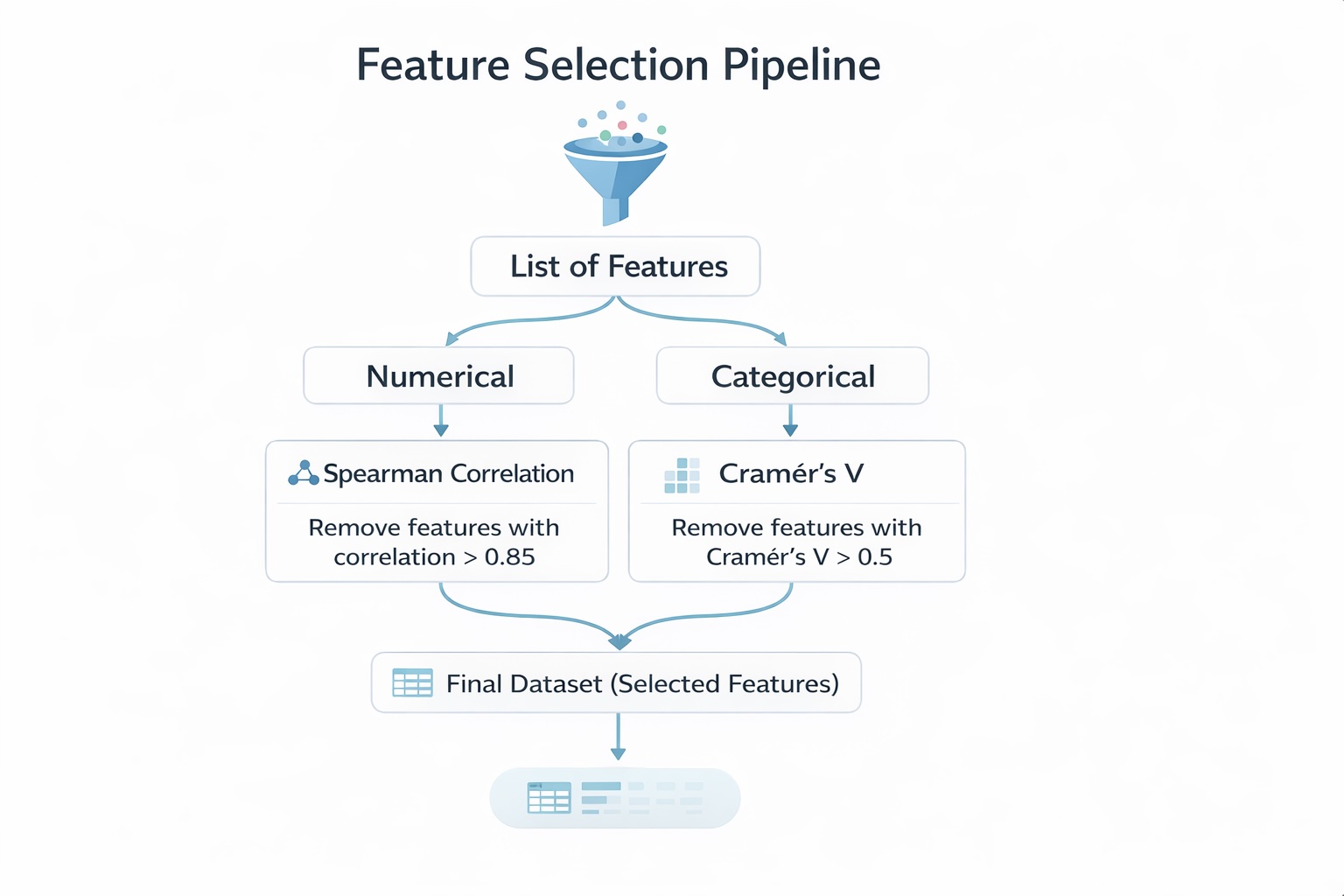
It is typically conducted on variables of the same type—continuous variables with continuous variables, or categorical variables with categorical variables—since specific measures are designed for each case. For example, we can use Spearman correlation for continuous variables, or Cramér’s V and Tschuprow’s T for categorical variables to quantify the strength of association.
In the following section, we assume that the available variables are relevant for discriminating default. It therefore becomes appropriate to use statistical tests to further investigate the relationships between variables. We will describe a structured methodology for selecting the appropriate tests and provide clear justification for these choices.
The goal is not to cover every possible test, but rather to present a coherent and robust approach that can guide you in building a reliable scoring model.
1.2 Multicollinearity Between Variables
In credit scoring, when we talk about multicollinearity, the first thing that usually comes to mind is the Variance Inflation Factor (VIF). However, there is a much simpler approach that can be used when dealing with a large number of explanatory variables. This approach allows for an initial screening of relevant variables and helps reduce dimensionality by analyzing the relationships between variables of the same type.
In the following sections, we show how studying the relationships between continuous variables and between categorical variables can help identify redundant information and support the preselection of explanatory variables.
1.2.1 Test statistic for the study: Relationship Between Continuous Explanatory Variables
In scoring models, analyzing the relationship between two continuous variables is generally used to pre-select variables and reduce dimensionality. This analysis becomes particularly relevant when the number of explanatory variables is very large (e.g., more than 100), as it can significantly reduce the number of variables.
In this section, we focus on the case of two continuous explanatory variables. In the next section, we will examine the case of two categorical variables.
To study this association, the Pearson correlation can be used. However, in most cases, the Spearman correlation is preferred, as it is a non-parametric measure. In contrast, Pearson correlation only captures linear relationships between variables.
Spearman correlation is often preferred in practice because it is robust to outliers and does not rely on distributional assumptions. It measures how well the relationship between two variables can be described by a monotonic function, whether linear or not.
Mathematically, it is computed by applying the Pearson correlation formula to the ranked variables:
ρX,Y=Cov(RankX,RankY)σRankXσRankY\rho_{X,Y} = \frac{\mathrm{Cov}(\mathrm{Rank}_X, \mathrm{Rank}_Y)}{\sigma_{\mathrm{Rank}_X} \, \sigma_{\mathrm{Rank}_Y}}
Therefore, in this context, Spearman correlation is selected to assess the relationship between two continuous variables.
If two or more independent continuous variables exhibit a high pairwise Spearman correlation (e.g., ≥ 0.6 or 60%), this suggests that they carry similar information. In such cases, it is appropriate to retain only one of them—either the variable that is most strongly correlated with the target (default) or the one considered most relevant based on domain expertise.
1.2.2 Test statistic for the study: Relationship Between Qualitative Explanatory Variables.
As in the analysis of the relationship between an explanatory variable and the target (default), Cramér’s V is used here to assess whether two or more qualitative variables provide the same information.
For example, if Cramér’s V exceeds 0.5 (50%), the variables are considered to be highly associated and may capture similar information. Therefore, they should not be included simultaneously in the model, as this would introduce redundancy.
The choice of which variable to retain can be based on statistical criteria—such as keeping the variable that is most strongly associated with the target (default)—or on domain expertise, by selecting the variable considered the most relevant from a business perspective.
As you may have noticed, we study the relationship between a continuous variable and a categorical variable as part of the dimensionality reduction process, since there is no direct indicator to measure the strength of the association, unlike Spearman correlation or Cramér’s V.
For those interested, one possible approach is to use the Variance Inflation Factor (VIF). We will cover this in a future publication. It is not discussed here because the methodology for computing VIF may differ depending on whether you use Python or R. These specific aspects will be addressed in the next post.
In the following section, we will apply everything discussed so far to real-world data, specifically the dataset introduced in our previous article.
1.3 Application in the real data
This section analyzes the correlations between variables and contributes to the pre-selection of variables. The data used are those from the previous article, where outliers and missing values were already treated.
Three types of correlations (each using a different statistical test seen above) are analyzed :
- Correlation between continuous variables and the default variable (Kruskall-Wallis test)
- Correlations between qualitatives variables and the default variables (Cramer’s V).
- Multi-correlations between continuous variables (Spearman test)
- Multi-correlations between qualitatives variables (Cramer’s V)
1.3.1 Correlation between continuous variables and the default variable
In the train database, we have seven continuous variables :
- person_income
- person_age
- person_emp_length
- loan_amnt
- loan_int_rate
- loan_percent_income
The table below presents the p-values from the Kruskal–Wallis test, which measure the relationship between these variables and the default variable.
def correlation_quanti_def_KW(database: pd.DataFrame,
continuous_vars: list,
target: str) -> pd.DataFrame:
“””
Compute Kruskal-Wallis test p-values between continuous variables
and a categorical (binary or multi-class) target.
Parameters
———-
database : pd.DataFrame
Input dataset
continuous_vars : list
List of continuous variable names
target : str
Target variable name (categorical)
Returns
——-
pd.DataFrame
Table with variables and corresponding p-values
“””
results = []
for var in continuous_vars:
# Drop NA for current variable + target
df = database[[var, target]].dropna()
# Group values by target categories
groups = [
group[var].values
for _, group in df.groupby(target)
]
# Kruskal-Wallis requires at least 2 groups
if len(groups) < 2:
p_value = None
else:
try:
stat, p_value = kruskal(*groups)
except ValueError:
# Handles edge cases (e.g., constant values)
p_value = None
results.append({
“variable”: var,
“p_value”: p_value,
“stats_kw”: stat if ‘stat’ in locals() else None
})
return pd.DataFrame(results).sort_values(by=”p_value”)
continuous_vars = [
“person_income”,
“person_age”,
“person_emp_length”,
“loan_amnt”,
“loan_int_rate”,
“loan_percent_income”,
“cb_person_cred_hist_length”
]
target = “def”
result = correlation_quanti_def_KW(
database=train_imputed,
continuous_vars=continuous_vars,
target=target
)
print(result)
# Save results to xlsx
result.to_excel(f”{data_output_path}/correlation/correlations_kw.xlsx”, index=False)
By comparing the p-values to the 5% significance level, we observe that all are below the threshold. Therefore, we reject the null hypothesis for all variables and conclude that each continuous variable is significantly associated with the default variable.
1.3.2 Correlations between qualitative variables and the default variables (Cramer’s V).
In the database, we have four qualitative variables :
- person_home_ownership
- cb_person_default_on_file
- loan_intent
- loan_grade
The table below reports the strength of the association between these categorical variables and the default variable, as measured by Cramér’s V.
def cramers_v_with_target(database: pd.DataFrame,
categorical_vars: list,
target: str) -> pd.DataFrame:
“””
Compute Chi-square statistic and Cramér’s V between multiple
categorical variables and a target variable.
Parameters
———-
database : pd.DataFrame
Input dataset
categorical_vars : list
List of categorical variables
target : str
Target variable (categorical)
Returns
——-
pd.DataFrame
Table with variable, chi2 and Cramér’s V
“””
results = []
for var in categorical_vars:
# Drop missing values
df = database[[var, target]].dropna()
# Contingency table
contingency_table = pd.crosstab(df[var], df[target])
# Skip if not enough data
if contingency_table.shape[0] < 2 or contingency_table.shape[1] < 2:
results.append({
“variable”: var,
“chi2”: None,
“cramers_v”: None
})
continue
try:
chi2, _, _, _ = chi2_contingency(contingency_table)
n = contingency_table.values.sum()
r, k = contingency_table.shape
v = np.sqrt((chi2 / n) / min(k – 1, r – 1))
except Exception:
chi2, v = None, None
results.append({
“variable”: var,
“chi2”: chi2,
“cramers_v”: v
})
result_df = pd.DataFrame(results)
# Option : tri par importance
return result_df.sort_values(by=”cramers_v”, ascending=False)
qualitative_vars = [
“person_home_ownership”,
“cb_person_default_on_file”,
“loan_intent”,
“loan_grade”,
]
result = cramers_v_with_target(
database=train_imputed,
categorical_vars=qualitative_vars,
target=target
)
print(result)
# Save results to xlsx
result.to_excel(f”{data_output_path}/correlation/cramers_v.xlsx”, index=False)
The results indicate that most variables are associated with the default variable. A moderate association is observed for loan_grade, while the other categorical variables exhibit weak associations.
1.3.3 Multi-correlations between continuous variables (Spearman test)
To identify continuous variables that provide similar information, we use the Spearman correlation with a threshold of 60%. That is, if two continuous explanatory variables exhibit a Spearman correlation above 60%, they are considered redundant and to capture similar information.
def correlation_matrix_quanti(database: pd.DataFrame,
continuous_vars: list,
method: str = “spearman”,
as_percent: bool = False) -> pd.DataFrame:
“””
Compute correlation matrix for continuous variables.
Parameters
———-
database : pd.DataFrame
Input dataset
continuous_vars : list
List of continuous variables
method : str
Correlation method (“pearson” or “spearman”), default = “spearman”
as_percent : bool
If True, return values in percentage
Returns
——-
pd.DataFrame
Correlation matrix
“””
# Select relevant data and drop rows with NA
df = database[continuous_vars].dropna()
# Compute correlation matrix
corr_matrix = df.corr(method=method)
# Convert to percentage if required
if as_percent:
corr_matrix = corr_matrix * 100
return corr_matrix
corr = correlation_matrix_quanti(
database=train_imputed,
continuous_vars=continuous_vars,
method=”spearman”
)
print(corr)
# Save results to xlsx
corr.to_excel(f”{data_output_path}/correlation/correlation_matrix_spearman.xlsx”)
We identify two pairs of variables that are highly correlated:
- The pair (cb_person_cred_hist_length, person_age) with a correlation of 85%
- The pair (loan_percent_income, loan_amnt) with a high correlation
Only one variable from each pair should be retained for modeling. We rely on statistical criteria to select the variable that is most strongly associated with the default variable. In this case, we retain person_age and loan_percent_income.
1.3.4 Multi-correlations between qualitative variables (Cramer’s V)
In this section, we analyze the relationships between categorical variables. If two categorical variables are associated with a Cramér’s V greater than 60%, one of them should be removed from the candidate risk driver list to avoid introducing highly correlated variables into the model.
The choice between the two variables can be based on expert judgment. However, in this case, we rely on a statistical approach and select the variable that is most strongly associated with the default variable.
The table below presents the Cramér’s V matrix computed for each pair of categorical explanatory variables.
def cramers_v_matrix(database: pd.DataFrame,
categorical_vars: list,
corrected: bool = False,
as_percent: bool = False) -> pd.DataFrame:
“””
Compute Cramér’s V correlation matrix for categorical variables.
Parameters
———-
database : pd.DataFrame
Input dataset
categorical_vars : list
List of categorical variables
corrected : bool
Apply bias correction (recommended)
as_percent : bool
Return values in percentage
Returns
——-
pd.DataFrame
Cramér’s V matrix
“””
def cramers_v(x, y):
# Drop NA
df = pd.DataFrame({“x”: x, “y”: y}).dropna()
contingency_table = pd.crosstab(df[“x”], df[“y”])
if contingency_table.shape[0] < 2 or contingency_table.shape[1] < 2:
return np.nan
chi2, _, _, _ = chi2_contingency(contingency_table)
n = contingency_table.values.sum()
r, k = contingency_table.shape
phi2 = chi2 / n
if corrected:
# Bergsma correction
phi2_corr = max(0, phi2 – ((k-1)*(r-1)) / (n-1))
r_corr = r – ((r-1)**2) / (n-1)
k_corr = k – ((k-1)**2) / (n-1)
denom = min(k_corr – 1, r_corr – 1)
else:
denom = min(k – 1, r – 1)
if denom <= 0:
return np.nan
return np.sqrt(phi2_corr / denom) if corrected else np.sqrt(phi2 / denom)
# Initialize matrix
n = len(categorical_vars)
matrix = pd.DataFrame(np.zeros((n, n)),
index=categorical_vars,
columns=categorical_vars)
# Fill matrix
for i, var1 in enumerate(categorical_vars):
for j, var2 in enumerate(categorical_vars):
if i <= j:
value = cramers_v(database[var1], database[var2])
matrix.loc[var1, var2] = value
matrix.loc[var2, var1] = value
# Convert to percentage
if as_percent:
matrix = matrix * 100
return matrix
matrix = cramers_v_matrix(
database=train_imputed,
categorical_vars=qualitative_vars,
)
print(matrix)
# Save results to xlsx
matrix.to_excel(f”{data_output_path}/correlation/cramers_v_matrix.xlsx”)
From this table, using a 60% threshold, we observe that only one pair of variables is strongly associated: (loan_grade, cb_person_default_on_file). The variable we retain is loan_grade, as it is more strongly associated with the default variable.
Based on these analyses, we have pre-selected 9 variables for the next steps. Two variables were removed during the analysis of correlations between continuous variables, and one variable was removed during the analysis of correlations between categorical variables.
Conclusion
The objective of this post was to present how to measure the different relationships that exist between variables in a credit scoring model.
We have seen that this analysis can be used to evaluate the discriminatory power of explanatory variables, that is, their ability to predict the default variable. When the explanatory variable is continuous, we can rely on the non-parametric Kruskal–Wallis test to assess the relationship between the variable and default.
When the explanatory variable is categorical, we use Cramér’s V, which measures the strength of the association and is less sensitive to sample size than the chi-square test alone.
Finally, we have shown that analyzing relationships between variables also helps reduce dimensionality by identifying multicollinearity, especially when variables are of the same type.
For two continuous explanatory variables, we can use the Spearman correlation, with a threshold (e.g., 60%). If the Spearman correlation exceeds this threshold, the two variables are considered redundant and should not both be included in the model. One can then be selected based on its relationship with the default variable or based on domain expertise.
For two categorical explanatory variables, we again use Cramér’s V. By setting a threshold (e.g., 50%), we can assume that if Cramér’s V exceeds this value, the variables provide similar information. In this case, only one of the two variables should be retained—either based on its discriminatory power or through expert judgment.
In practice, we applied these methods to the dataset processed in our previous post. While this approach is effective, it is not the most robust method for variable selection. In our next post, we will present a more robust approach for pre-selecting variables in a scoring model.
Image Credits
All images and visualizations in this article were created by the author using Python (pandas, matplotlib, seaborn, and plotly) and excel, unless otherwise stated.
References
[1] Lorenzo Beretta and Alessandro Santaniello.
Nearest Neighbor Imputation Algorithms: A Critical Evaluation.
National Library of Medicine, 2016.
[2] Nexialog Consulting.
Traitement des données manquantes dans le milieu bancaire.
Working paper, 2022.
[3] John T. Hancock and Taghi M. Khoshgoftaar.
Survey on Categorical Data for Neural Networks.
Journal of Big Data, 7(28), 2020.
[4] Melissa J. Azur, Elizabeth A. Stuart, Constantine Frangakis, and Philip J. Leaf.
Multiple Imputation by Chained Equations: What Is It and How Does It Work?
International Journal of Methods in Psychiatric Research, 2011.
[5] Majid Sarmad.
Robust Data Analysis for Factorial Experimental Designs: Improved Methods and Software.
Department of Mathematical Sciences, University of Durham, England, 2006.
[6] Daniel J. Stekhoven and Peter Bühlmann.
MissForest—Non-Parametric Missing Value Imputation for Mixed-Type Data.Bioinformatics, 2011.
[7] Supriyanto Wibisono, Anwar, and Amin.
Multivariate Weather Anomaly Detection Using the DBSCAN Clustering Algorithm.
Journal of Physics: Conference Series, 2021.
[8] Laborda, J., & Ryoo, S. (2021). Feature selection in a credit scoring model. Mathematics, 9(7), 746.
Data & Licensing
The dataset used in this article is licensed under the Creative Commons Attribution 4.0 International (CC BY 4.0) license.
This license allows anyone to share and adapt the dataset for any purpose, including commercial use, provided that proper attribution is given to the source.
For more details, see the official license text: CC0: Public Domain.
Disclaimer
Any remaining errors or inaccuracies are the author’s responsibility. Feedback and corrections are welcome.
